 +971 50 5473745


CMS Security in 2026: Protecting Your Website from 11,000+ Vulnerabilities
The 2025 Security Landscape: A 42% Increase
In 2025, the CMS security landscape reached a crisis point. 11,334 vulnerabilities were discovered across major content management systems — a 42% increase from 2024. This isn’t a statistic. It’s a warning.
| CMS | Vulnerabilities | % of Total | YoY Change | Primary Risk |
|---|---|---|---|---|
| WordPress | 8,247 plugins 1,892 themes 1,195 core | 100% of WP ecosystem | +42% | Plugin abandonment, poor code quality |
| Joomla | 287 | 2.5% | +15% | Legacy code, slow patching |
| Drupal | 156 | 1.4% | -8% | Improved security practices |
| Shopify | 23 | 0.2% | +12% | Third-party app vulnerabilities |
| Wix | 8 | 0.07% | +33% | Platform-level issues (rare) |
| Squarespace | 5 | 0.04% | +25% | Platform-level issues (rare) |
The Human Cost
- 30,000+ websites hacked daily
- $10.5 trillion in global cybercrime damage by 2025
- Average data breach cost: $4.45 million
- 60% of small businesses close within 6 months of a major cyberattack
For Dubai businesses, where digital trust is paramount and regulatory compliance is tightening, CMS security isn’t an IT issue — it’s a business survival issue.
Platform-Specific Vulnerabilities: WordPress, Joomla, Drupal
WordPress: The Plugin Problem
WordPress’s open ecosystem is its greatest strength and its fatal weakness. With 60,000+ plugins and 10,000+ themes, the attack surface is enormous.
The Plugin Vulnerability Crisis
| Plugin Category | Vulnerability Rate | Common Issues |
|---|---|---|
| SEO plugins | High | XSS, SQL injection, privilege escalation |
| E-commerce plugins | Very High | Payment bypass, data leakage, CSRF |
| Form builders | High | File upload vulnerabilities, XSS |
| Page builders | Medium-High | XSS, unauthorized access |
| Security plugins | Medium | Sometimes vulnerable themselves |
| Backup plugins | Medium | Unauthorized access, data exposure |
| Cache plugins | Medium | Cache poisoning, information disclosure |
| Social media plugins | Medium | XSS, API key exposure |
The Abandoned Plugin Epidemic
- 30% of WordPress plugins haven’t been updated in 2+ years
- 12% of plugins have no active maintainer
- 5% of plugins have known vulnerabilities with no patch available
High-Risk Plugins (2025–2026)
Plugins with the most critical vulnerabilities discovered include:
- Contact form plugins — file upload vulnerabilities
- E-commerce plugins — payment processing flaws
- Membership plugins — privilege escalation
- Backup plugins — unauthorized data access
- Slider/gallery plugins — XSS vulnerabilities
The Supply Chain Attack Risk
In 2025, a popular WordPress plugin with 1M+ active installs was compromised. The attacker injected a backdoor that granted access to every site using the plugin. Within 48 hours, 100,000+ sites were potentially compromised before the issue was discovered and patched.
This is the supply chain attack risk: one compromised plugin can affect thousands of sites simultaneously.
Joomla: The Legacy Challenge
- Legacy codebase: Much of Joomla’s core is 10+ years old
- Slow patching: Average patch time is 45 days
- Extension ecosystem: 8,000+ extensions with varying code quality
Joomla Security Best Practices
- Update to Joomla 4.x
- Remove unused extensions
- Use a Web Application Firewall (WAF)
- Implement two-factor authentication
- Perform regular security audits
Drupal: The Security Success Story
- Dedicated security team with rigorous review process
- Higher coding standards than WordPress or Joomla
- Critical patches within 24 hours
- Vulnerabilities declined by 8% year-over-year
Why Drupal Is More Secure
- Module code is reviewed before acceptance
- Strict coding standards are enforced
- Built-in CSRF protection
- XSS filtering
- SQL injection prevention
- Enterprise-focused development culture
The Trade-off: Drupal’s security comes at the cost of complexity. It is harder to learn, harder to customize, and requires more technical expertise than WordPress.
Essential Security Plugins and Tools
WordPress Security Stack
| Layer | Tool | Purpose | Cost |
|---|---|---|---|
| Firewall | Wordfence or Sucuri | Block malicious traffic, brute force protection | Free–$99/year |
| Malware scanning | Wordfence, Sucuri, or MalCare | Detect and remove malware | Free–$199/year |
| Login security | Wordfence or Limit Login Attempts | Prevent brute force attacks | Free |
| Two-factor auth | Wordfence 2FA or Two Factor | Add authentication layer | Free |
| Backup | UpdraftPlus or BlogVault | Automated backups | Free–$99/year |
| SSL | Let’s Encrypt or premium certificate | Encrypt data transmission | Free–$50/year |
| WAF (cloud) | Cloudflare or Sucuri | Filter traffic before reaching server | Free–$200/month |
| Activity log | WP Activity Log or Simple History | Monitor admin actions | Free–$89/year |
The Security Plugin Configuration Checklist
| Setting | Recommended Value | Why |
|---|---|---|
| Firewall mode | Extended protection | Blocks malicious requests |
| Brute force protection | Enabled, 4 attempts, 4-hour lockout | Prevents password guessing |
| Login security | 2FA required for admins | Prevents credential theft |
| Scan frequency | Daily | Early malware detection |
| Alert emails | Critical + high severity only | Avoid alert fatigue |
| Rate limiting | Enabled | Prevents DDoS and scraping |
| Block IP after failed logins | 20 attempts in 24 hours | Automatic threat blocking |
SaaS Platform Security: Shopify, Wix, Squarespace
Advantages
- Automatic security patches
- DDoS protection
- SSL certificates included
- PCI-DSS compliance for e-commerce
- Regular security audits
- Intrusion detection
Your Responsibility
- Use strong passwords and 2FA
- Control user access
- Vet third-party apps
- Review accounts regularly
- Provide phishing awareness training
SSL, WAF, and DDoS Protection
SSL/TLS: The Encryption Foundation
SSL (Secure Sockets Layer) and its successor TLS (Transport Layer Security) encrypt data between the user’s browser and your server.
SSL Requirements
- HTTPS is a confirmed Google ranking signal
- Chrome flags non-HTTPS sites as “Not Secure”
- 85% of users abandon purchases on non-HTTPS sites
- PCI-DSS compliance requires secure payment processing
- Data protection requirements apply under UAE regulations
SSL Implementation
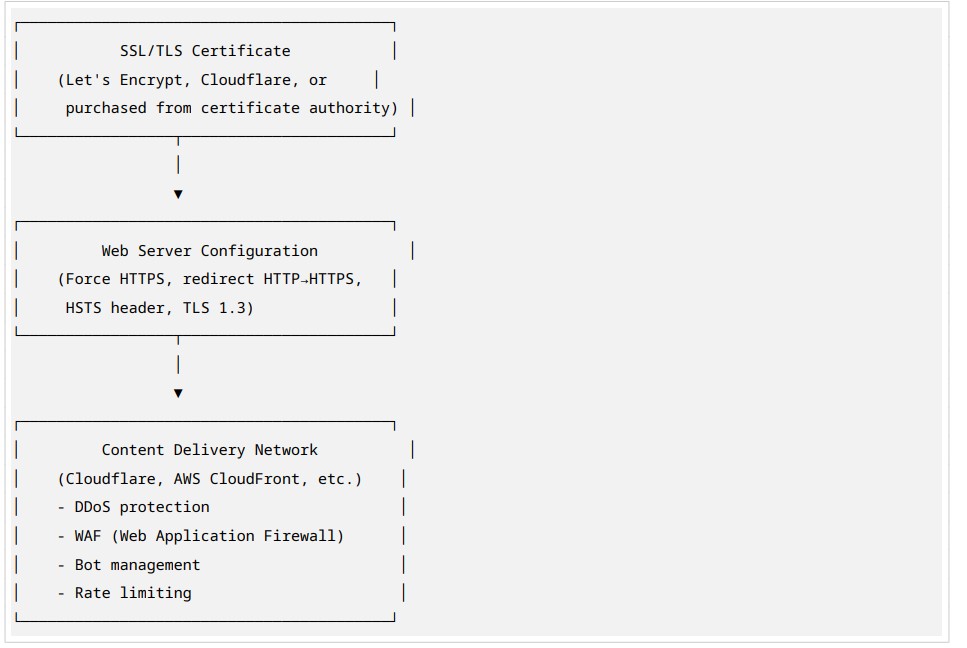
SSL Best Practices
- Use TLS 1.3
- Implement HSTS
- Use 2048-bit or higher RSA keys
- Renew certificates before expiration
- Monitor for certificate issues
Web Application Firewall (WAF)
A WAF filters malicious traffic before it reaches your server.
| Layer | What It Blocks | Example |
|---|---|---|
| SQL Injection | Database attacks | Malicious SQL queries |
| XSS | Script injection | Malicious JavaScript |
| CSRF | Unauthorized actions | Forged admin requests |
| File inclusion | Remote file execution | Malicious remote files |
| Brute force | Password guessing | Repeated login attempts |
| Bot traffic | Scraping and spam | Automated form submissions |
| DDoS | Traffic overload | Large volumes of requests |
WAF Options
| WAF Type | Cost | Best For |
|---|---|---|
| Cloudflare | Free–$200/month | Most websites |
| Sucuri | $199–$499/year | WordPress sites |
| AWS WAF | $5–$100/month | AWS-hosted sites |
| Wordfence | Free–$99/year | WordPress sites |
| ModSecurity | Free | Self-managed servers |
DDoS Protection Strategies
- CDN-Based Protection
- Cloudflare, AWS CloudFront, or Akamai absorb attack traffic
- Automatic mitigation for most attacks
- Cost: $0–$200/month
- Dedicated DDoS Protection
- Specialized services for high-risk targets
- Always-on or on-demand protection
- Cost: $500–$5,000/month
- Hosting-Level Protection
- Many managed hosts include DDoS protection
- Limited effectiveness for large attacks
- Cost: Included in hosting
DDoS Attack Statistics
- Average attack duration: 4 hours
- Average attack size: 5 Gbps
- Cost of 1-hour downtime: $5,000–$100,000+ for e-commerce
- Prevention cost: $0–$500/month
Backup Strategies: Automated and Off-Site
The 3-2-1 Backup Rule
- 3 copies of your data
- 2 different media types (local + cloud)
- 1 off-site backup in a different physical location
Backup Strategy for Dubai Businesses
| Layer | Method | Frequency | Retention |
|---|---|---|---|
| Real-time | Database replication | Continuous | 24 hours |
| Daily | Full site backup (files + database) | Daily | 30 days |
| Weekly | Full site backup to off-site | Weekly | 12 weeks |
| Monthly | Archive backup to separate region | Monthly | 12 months |
| Pre-update | Manual backup before any changes | As needed | Until verified |
Backup Tools by Platform
| Platform | Recommended Tool | Cost | Features |
|---|---|---|---|
| WordPress | UpdraftPlus, BlogVault, Jetpack Backup | Free–$199/year | Automated, off-site, one-click restore |
| Shopify | Shopify Backup (Rewind) | $9–$299/month | Automated daily backups, partial restore |
| Wix | Built-in backup | Included | Manual site restore points |
| Custom | rsync + database dump + cloud storage | $5–$50/month | Full control, custom scheduling |
Backup Testing
The most common backup failure is having backups that exist but cannot be restored.
- Restore from backup to a staging environment quarterly
- Verify all content, functionality, and data integrity
- Document restore time — should be under 2 hours for critical sites
- Test backup integrity checks monthly
User Access Control and Role Management
The Principle of Least Privilege
Every user should have the minimum permissions necessary to perform their role.
No more, no less.
WordPress Role Matrix
| Role | Capabilities | Risk Level |
|---|---|---|
| Super Admin | Full control across network | Critical |
| Administrator | Full control on single site | Critical |
| Editor | Publish and manage all posts | High |
| Author | Publish and manage own posts | Medium |
| Contributor | Write posts, can’t publish | Low |
| Subscriber | Read only, manage profile | Minimal |
Security Best Practices
- Minimize Admin Accounts
- Only 1–2 administrators per site
- Use Editor role for content managers
- Remove admin accounts for departed employees immediately
- Enforce Strong Passwords
- Minimum 16 characters
- Mix uppercase, lowercase, numbers, and symbols
- No dictionary words or personal information
- Password manager required
- Implement Two-Factor Authentication (2FA)
- Mandatory for all admin accounts
- Recommended for Editor and Author roles
- Use authenticator apps rather than SMS
- Regular Access Review
- Quarterly audit of all user accounts
- Remove inactive accounts
- Verify role appropriateness
- Check for unauthorized accounts
- Login Monitoring
- Log all login attempts
- Alert on failed login attempts
- Track login locations and times
- Detect suspicious patterns
Security Audits: How Often and What to Check
The Security Audit Schedule
| Audit Type | Frequency | Scope | Owner |
|---|---|---|---|
| Automated scan | Daily | Malware, vulnerabilities | Automated tool |
| Vulnerability scan | Weekly | Plugin/theme/core updates | Security plugin |
| Access review | Monthly | User accounts, permissions | Admin |
| Backup test | Monthly | Restore from backup | Admin/DevOps |
| Configuration review | Quarterly | Security settings, WAF rules | Security team |
| Penetration test | Annually | Simulated attack | External security firm |
| Compliance audit | Annually | Regulatory requirements | Compliance officer |
The Security Audit Checklist
Technical Security
- CMS core updated to latest version
- All plugins/themes updated
- No abandoned plugins installed
- SSL certificate valid and properly configured
- HTTPS enforced with no mixed content
- Security headers present: HSTS, CSP, X-Frame-Options
- WAF active and configured
- DDoS protection enabled
- Backup system operational
- Malware scan clean
- No suspicious admin accounts
- File permissions correct: 644 for files, 755 for directories
- Database accessible only from localhost
- Error logs reviewed for anomalies
Access Security
- 2FA enabled for all admin accounts
- Password policy enforced
- Inactive accounts disabled
- Login attempt limits configured
- IP whitelist for admin access where applicable
- Session timeout configured
- Admin URL obscured where applicable
Dubai Businesses: Compliance and Data Protection
UAE Data Protection Law
The UAE’s data protection framework is evolving. Key requirements for
Dubai businesses.
Federal Decree-Law No. 45 of 2021 (Personal Data Protection Law).
- Consent required for data collection
- Data minimization principle
- Right to access, correct, and delete personal data
- Data breach notification within 72 hours to authorities
- Cross-border data transfer restrictions
Dubai International Financial Centre (DIFC) Data Protection Law
- Stricter than federal law
- Applies to businesses operating in DIFC
- Heavy penalties for non-compliance
CMS Security Compliance Checklist
| Requirement | Implementation |
|---|---|
| SSL encryption | HTTPS enforced, TLS 1.3 |
| Data minimization | Collect only necessary data |
| Consent management | Cookie consent, opt-in forms |
| Access controls | Role-based permissions, 2FA |
| Data retention | Defined retention policies, automatic deletion |
| Breach response | Incident response plan, 72-hour notification |
| Third-party audits | Vendor security assessments |
| Employee training | Security awareness program |
| Documentation | Security policies, procedures, logs |

Top rated e-commerce web development company in UAE
24 million e-commerce websites and counting! You read that right. That's how many e-commerce website
Multilingual CMS Setup for UAE: Arabic, English, and Beyond
Why Multilingual Matters in the UAE Market Dubai is one of the most linguistically diverse cities on

Hiring a web development company made easy with HelloPixels
The internet is cluttered with numerous web development companies leaving us in a dilemma to hire wh


